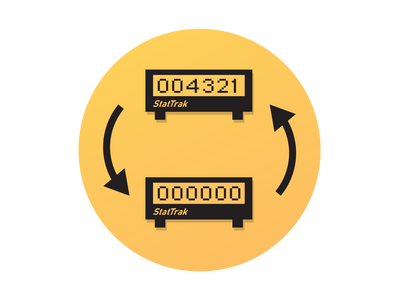
The StatTrak Swap Tool and the rest of the CS2 tools
The StatTrak Swap Tool is a single-use Base Grade item that exchanges the StatTrak counters of two items of the same weapon. Valve added it to CS:GO in the same update that opened trade-up contracts to StatTrak skins, and it carried over into CS2. It is not a drop from cases: Valve sells the tool in the in-game store, but since November 12, 2025, newly purchased copies can no longer be traded or listed on the Steam Community Market. Older tradable copies remain available through player-to-player marketplaces.
Steam files a handful of utilities under the Tool type, and the ones players know as CS:GO tools — Name Tag, the swap tool and Storage Unit — all made the move to the new game. The Name Tag engraves a custom name on a weapon and has its own Name Tag section. The Storage Unit stays bound to the account that bought it, so it never reaches a trading grid at all. That leaves the swap tool as the item this page is built around, while neighbouring utilities such as case keys, charms and patches live in separate parts of the Other catalogue.
How does the StatTrak Swap Tool work?
It swaps rather than copies. The number on the first item moves to the second, the second item's number moves back to the first, and no kill is created or lost along the way. Before the game lets a swap through, every one of these conditions has to hold:
- both items are StatTrak versions — the tool cannot add a counter to a regular skin;
- both are the same weapon or the same knife model, while finish, exterior and rarity are free to differ;
- the tool and both items sit in your main inventory, not inside a Storage Unit;
- none of them carries Steam's Trade Protected label.
"Same weapon" is stricter than it sounds. A StatTrak AK-47 pairs with any other StatTrak AK-47, from a Mil-Spec finish to a Covert one. The M4A4 and the M4A1-S compete for the same loadout slot, yet they are different weapons, so their counters can't change places; the USP-S and the P2000 work the same way. Knives follow the model rule too: a StatTrak Karambit matches only another StatTrak Karambit and never a Butterfly Knife. Once you start using the tool, CS2 lists only the items that pass these checks, so an invalid pairing simply doesn't show up.
How to transfer StatTrak kills in CS2 to a skin you just bought
A StatTrak counter resets whenever the item goes through Steam trading or the Community Market — the warning is printed in the item's own description. A StatTrak skin bought from another player therefore arrives at zero, while every kill you earned stays on the copy you already own. This is the job the swap tool was made for: the new skin takes over your total, and the old one drops to zero, ready to be sold or kept as a spare. Upgrading from a battered StatTrak AWP to a cleaner finish is the classic case. Keep in mind that the counter only grows from the owner's kills on real opponents: bots and teammates never add to it.
Timing matters. Items received through a Steam trade stay Trade Protected for a while, and during that window Steam won't let them be consumed or modified. If the tool and the new skin arrive in fresh trades, both have to clear protection before the swap is possible, so buy them a little ahead of the moment you want the counter moved. Here is how to use the StatTrak Swap Tool once nothing involved is protected:
- Open your CS2 inventory and find the tool.
- Select it and choose Use.
- Pick the first StatTrak item, then the second one from the list of compatible items.
- Check which counter will land on which skin and confirm; the tool is used up at that moment.
One item, many listings: what is worth comparing
A CS2 StatTrak Swap Tool has no float, no exterior, no pattern and no StatTrak or Souvenir version of its own, so one copy works exactly like the next. The only things that separate listings are the asking price and the delivery terms. Sort the grid by price, narrow it with the Delivery filter when you need the tool soon, and the cheapest copy will do the same job as any other.
The in-game store sells the tool in a pack rather than one at a time. A pack suits someone who moves counters often; for a single swap after a skin upgrade, one tool from the grid is enough. If no listing fits your budget, the Bargain and Limit orders tabs above the grid are there for buyers who prefer to name their own price.
Buying and selling swap tools on white.market
Every deal here is P2P and settles through an ordinary Steam trade offer:
- Pick a listing from the sorted grid or agree on a price through Bargain.
- Pay, then accept the seller's trade offer in Steam.
- Wait for the Trade Protected status to expire before you use the tool.
- To sell spare tools, list them from your inventory and send the trade offer once a buyer pays.
Swap tool questions players ask
Will a swap move my stickers, Name Tag or float as well?
No. The tool exchanges the StatTrak values and nothing else. Finish, float, pattern, applied stickers and a custom name stay on the item they were on, so only the numbers trade places.
Can I undo a StatTrak swap?
Not directly. The tool is consumed the moment you confirm, and the inventory has no revert option. Putting the counters back means running a second swap between the same two items with another tool.
Does the tool work on gloves or Souvenir skins?
No. Gloves are never released as StatTrak, and Souvenir items come without a kill counter, so neither gives the tool anything to swap.
Does a swap tool or a big counter give any advantage in matches?
No. StatTrak is purely cosmetic: the counter has no effect on damage, accuracy or any other weapon stat, and moving kills between skins changes only what the display shows.