The legend has returned. For years, the community mourned the loss of the "old feel" after Counter-Strike 2 officially replaced CS:GO on September 27, 2023. While CS2 brought stunning visuals and sub-tick technology, purists missed the movement, the sprays, and the nostalgia of Global Offensive.
On March 3, 2026, Valve surprised everyone by uploading CS:GO as a standalone game on Steam. Fans are ecstatic, but there is a catch: official matchmaking is gone. If you want to play with real people, you’ll need to use the community server browser.
In this guide, we’ll show you exactly how to get back into the action.
Why did CS:GO Return?

When CS2 launched, it completely overwrote the CS:GO files, leaving only a "legacy" beta branch that was buggy and hard to access. By releasing CS:GO as a separate AppID in 2026, Valve has preserved the game's history. It’s the final 2023 build, frozen in time, ready for community-driven competition.
Step-by-Step: How to Connect to CS:GO Servers
Since you cannot simply click "Play" and find a match in-game, follow these steps to find active community servers:
1. Launch the Game
First, ensure you have downloaded the new standalone version. Once it's in your library, launch it as usual. You will notice that official modes (Competitive, Wingman, etc.) only allow you to play with bots.
2. Open the Steam Server Browser
You don't need to rely on the broken in-game menu. Steam has a built-in tool that works much better:
3. Filter for CS:GO
A new window will open. To find the right matches:
In the "Internet" tab, click "Change Filters" at the bottom.
In the "Game" dropdown, select Counter-Strike: Global Offensive.
Click the refresh (arrows) button in the upper right corner.
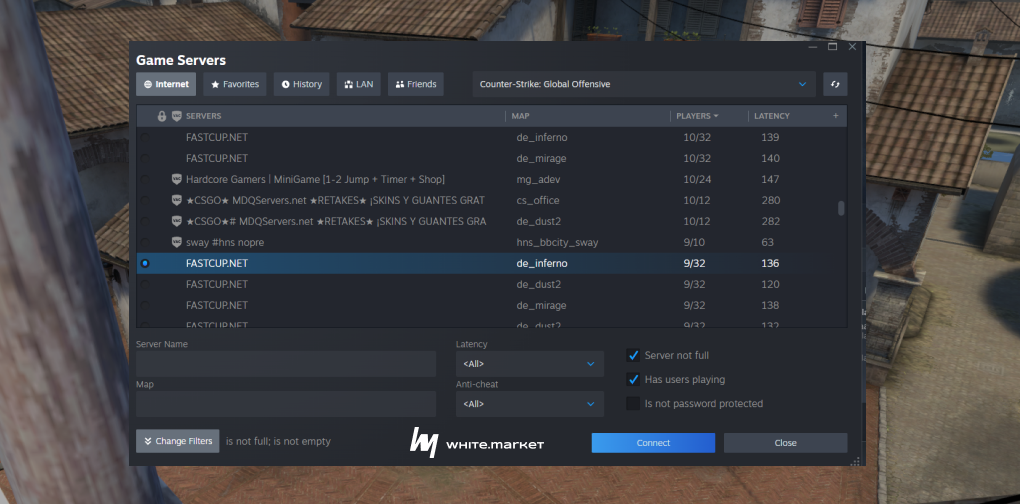
4. Join a Server
You will now see a list of active community-hosted servers (Surf, KZ, 5v5, and Deathmatch).
Find a server with a low ping.
Right-click on the server name.
Select "Connect to server".
Pro Tip: If the "Connect" button doesn't work, right-click and select "View Server Info," copy the IP address, and type connect [IP] in the game's developer console.
A Note on Skins and Inventory
This is the most important thing for traders and collectors to know: Your skins are not visible in the 2026 standalone CS:GO. Because this version uses a different AppID, it does not sync with the CS2 inventory coordinator. All your beautiful knives, gloves, and Dragon Lores stay in Counter-Strike 2. In CS:GO, you will be playing with default "vanilla" skins.
Looking for New Skins?
If the return of CS:GO has reignited your passion for the franchise and you want to upgrade your loadout for CS2, don't overpay on the Steam Market.
Check out white.market for the best deals.
Lower Prices: Save significantly compared to the Steam Community Market.
Security: All trades are secure and peer-to-peer.
Fast Cashouts: Unlike Steam, you can actually withdraw your funds.
Whether you're looking for a budget starter skin or a high-tier investment, white.market is the go-to platform for the modern CS player.
FAQ: Frequently Asked Questions
Where to download CS:GO?
It's available on the Steam Store, you can follow this page.
Can I get a VAC ban in CS:GO 2026?
Yes. Even though the game is "legacy," Valve’s Anti-Cheat (VAC) is still active on community servers. Use of cheats can lead to a ban that may affect your Steam profile and CS2 access.
Why does my game crash when I join a server?
Check your steam.inf file in the game folder. Sometimes the ClientVersion needs to be updated manually to match the server requirements.
Can I play Faceit on this version?
As of early 2026, Faceit focuses on CS2, but private hubs and community leagues are already popping up for the standalone CS:GO client.