Trading
CS2 Souvenir Trade-Ups: Rules, Market Impact, and Strategy
CS2 souvenir trade-up contracts: this guide explains the new mechanic, which collections to watch, how to craft, and skins market impact.
24 May 2026
If you sell a skin on a white.market or skin trading platform and notice that the funds are credited to your balance only after 8 days, this can be confusing, especially if you’re new to skin trading.
This delay is not caused by the marketplace itself. It is directly related to a Steam security feature called Trade Protection, which currently applies to Counter-Strike 2 items.
Below we explain how it works, why the waiting period exists, and why it cannot be bypassed.
Trade Protection is a Steam security feature designed to protect users if their account is compromised due to phishing, malware, or unauthorized access.
When a trade involving items from a Trade Protected game is completed:
The item is delivered instantly
The item can be used in-game
The trade remains reversible for 7 days
Currently, Counter-Strike 2 (CS2) is the only game that uses Trade Protection.
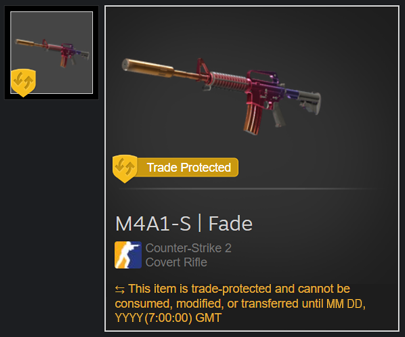
When you sell a CS2 skin on white.market, the process looks like this:
You sell your skin on white.market
The skin is transferred to the buyer immediately
Steam marks the item as Trade Protected for 7 days
During this period, Steam allows trade reversal
Funds remain pending on white.market
After 7 days, the trade becomes final
Funds are credited to your balance automatically on the 8th day
This delay is enforced by Steam and cannot be bypassed by any marketplace.
During the Trade Protection window, Steam can reverse the trade if the original owner regains control of their account.
If that happens:
The skin is returned to the original owner
The buyer loses the item
The marketplace would incur a financial loss
To protect buyers, sellers, and the platform itself, white.market releases funds only after the trade becomes irreversible.
This rule applies to all legitimate CS2 marketplaces, without exception.
All Counter-Strike 2 skins
Any CS2 item received via trade
Items clearly marked as Trade Protected in Steam inventory
Protected and non-protected items cannot be mixed in one trade
Protection always lasts exactly 7 days
The timer starts when the trade is confirmed
No.
Users cannot disable Trade Protection
Marketplaces cannot skip the waiting period
Steam Support cannot shorten the timer
Once the 7 days expire, the protection is removed automatically.
Although the delay may feel inconvenient, Trade Protection significantly improves safety:
Protects users from permanent item loss
Prevents laundering of stolen skins
Reduces large-scale fraud
Makes CS2 trading safer overall
This system benefits both new and experienced traders.
If you choose to reverse a trade containing Trade Protected items, here’s what happens:
All eligible trades from the last 7 days are reversed.
Only trades marked as Trade Protected can be reversed.
Trades older than 7 days cannot be undone.
Items are returned to their previous owners.
Your account will be temporarily restricted from trading or using the Steam Community Market for 30 days.
This restriction helps prevent further security issues.
Your pending market activity is canceled.
Any items you listed on the Steam Market will be returned to your inventory.
Any pending trade offers you sent will be canceled automatically.
Buyers should remember: reversing a trade does not refund money, it only returns items to their original owners.
If your funds are pending after selling a CS2 skin on white.market, this is normal.
Key points:
Steam applies a mandatory 7-day Trade Protection period
Trades can be reversed during this window
white.market must wait until the trade becomes final
Funds are credited automatically after 7 days